TSE-only export (samples)
Purpose of this export
The TSE-only export is used to export only the signature files stored on the technical security device (TSE) in TAR format.
This procedure is mainly used for
-
Random sample audits by auditors
-
targeted analysis of TSE data without complete DSFinV_K export
-
technical signature integrity checks
When to use this procedure
Auditors or tax authorities explicitly request only TSE data.
To verify individual periods or transactions as part of an ongoing audit.
When troubleshooting, if defective or missing signatures are suspected.
Procedure
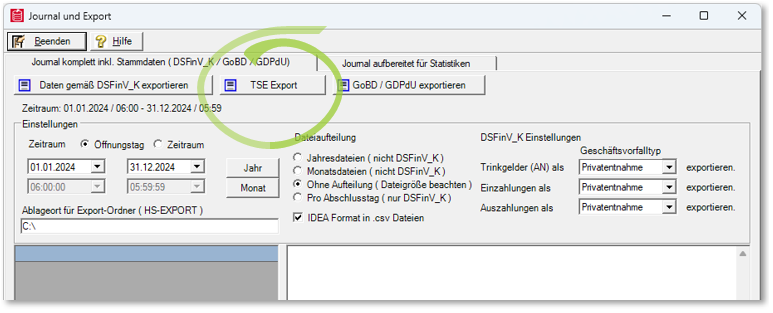
Open dialogue
-
Menu path: Journal export → DSFinV_K / GDPdU / AmadeusVerify Export
-
Activate the TSE Export option.
-
Select period
-
Specify the time period for the TSE log files (days, months, years). Recommendation: Narrow down the time period to reduce the amount of data.
-
Set storage location. The TAR files are saved in the same directory as the DSFinV_K export.
-
Start export
Every active TSE in the system is queried.
Progress is visible in the status window.
-
Check result
TAR files can be checked with AmadeusVerify or comparable tools.
Technical information
One request is sent per TSE - if a TSE cannot be reached, the "Requested" status remains until the process is completed or reset.
There is currently no deletion function for manually exported TAR files (status: last known version).
When using the TSE online archive, a TSE-only export is generally only necessary in special cases, as all signatures are already archived there.
Best Practices
Always check in advance whether the time period has been selected correctly in order to avoid unnecessarily large amounts of data.
If there are several TSEs in the system, check the exports per device to recognise gaps.
If an export fails, check the device or contact support.
Further topics:
DSFinV_K Export - Instructions & file structure
TSE online archive - backup and provision
Back to the overarching topic: Audit-relevant exports