DSFinV_K Export - Instructions & file structure
Purpose of the export
The DSFinV_K export is the legally prescribed standard procedure for the provision of cash register data in Germany.
It contains transaction data, master data and TSE signatures and is used to prove the complete and seamless recording of all processes during a tax audit.
The exported data can be analysed using the AmadeusVerify verification tool or comparable software.
When to use this procedure
Always for legally required inspections in Germany.
Supplementary to GDPdU/GoBD export if auditors require additional information.
In conjunction with the TSE online archive to ensure complete signature data.
Procedure at a glance
Start the Journal and Export programme from the MCP
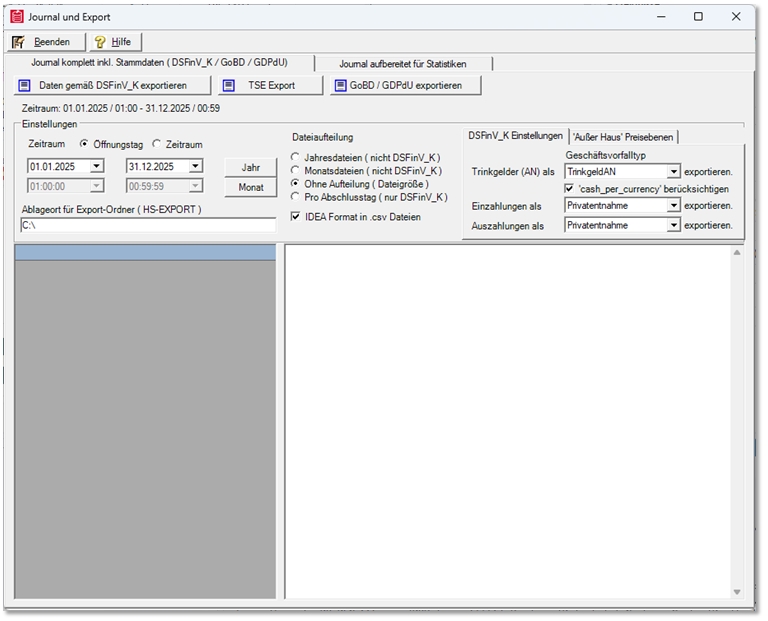
Select from the possible settings as required. Use the default settings (marked here with an asterisk):
Tips (employees, AN)...
-
Private withdrawal
-
* TipAN
-
Payout
Cash per currency option: If this option is activated, the tip is deducted when calculating the sales total. Background: Tips are signed in the Hypersoft system as part of the TSE. For transparent evaluation in journals and reports, an automatic offsetting entry is currently generated in the journal for tips. This serves exclusively to separate turnover and tips administered in trust. Depending on the version of Amadeus Verify used, this constellation can be displayed as an indication or an indication of a deviation. Hypersoft is continuously developing the transparency and technical mapping of this issue.
Deposits...
-
Private withdrawal
-
* Deposit
-
Cash transit
Payouts...
-
Private withdrawal
-
* Payout
-
Cash transit
Execute export
-
Select period
-
Opening day (start date to end of day) or exact date range. For establishments with opening hours after midnight, pay attention to overlaps.
-
-
Set export type
-
Per completion day → individual files per day (recommended for long periods).
-
Total period → a file for the entire period.
-
Determine storage location
-
-
Automatically generated folder structure:
-
/HS-EXPORT/<date range>/<export files>
-
-
Start export
-
The data is retrieved. One request is sent per TSE, these can be seen in the status window above. The requirements are also in the field Requested.
-
-
File structure
-
index.xml - central overview of all exported files, format required by the tax office.
-
TAR folder - contains the TSE log files (*.tar), separated by month.
-
CSV/XML tables - transaction and master data (e.g. journal, payment, item status).
-
changelog.csv - History of important master data changes.
-

-
Depending on the amount of data, the process can take several minutes to hours.
Note: If the licence for the TSE online archive is active, only the relevant TSE monthly archives are exported; older signatures are archived. If you do not use a TSE archive, HYpersoft can no longer support TAR export. Use the resources of the TSE Stick.
Important options
-
Tip export - as a private withdrawal, cash or payment.
-
Incoming and outgoing payments - allocation as private withdrawal, deposit or cash transit.
-
Without splitting - summarises all data in one file.
-
Per closing day - creates separate files per day, avoids size limits.
Price level allocation (out of house / in house)
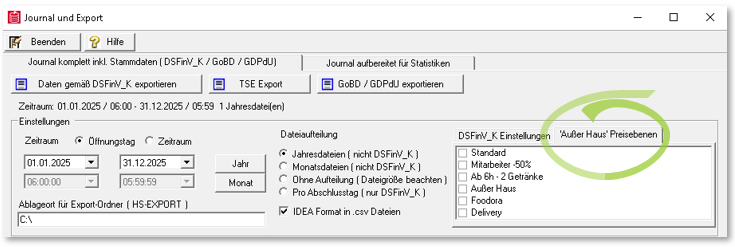
An option for price level allocation is available in the journal and export module.
The Out-of-home price levels setting is used if a company maps out-of-home bookings via a special price level (not standard). In this case, the relevant price level is marked as an out-of-house level in the dialogue. Normally, the status "Inhouse/Outhouse" is set in the export by the booking status "IH/AH", which is assigned directly when booking. However, if only one price level is used and there is no IH/AH status in the bookings, the export cannot recognise the allocation automatically.
This option allows the user to tell the export which price levels are used in the company for out-of-home bookings. When exporting, the bookings are then automatically labelled accordingly - as in-house or out-of-house.
The statutory AH function (out-of-home functionality) remains independent of this and unchanged. The price level assignment is used exclusively to correctly map the price levels used in the company in the export.
Hypersoft also offers further options for automated control of out-of-home functions.
For owners / financial managers
You can mark one or more price levels as out-of-house in the export dialogue.
This means that the relevant sales are correctly labelled as out-of-home sales in the export - even if the statutory out-of-home function was not used on a day-to-day basis.
The sales tax logic remains unchanged: It was already defined during posting and saved in the journal.
For auditors
In the DSFinV_K export, sales posted via price levels are now clearly recognisable as in-house or external.
This ensures that even company-specific solutions (price levels instead of AH function) lead to a transparent and audit-proof result.
Nothing changes in terms of tax or amounts - only the labelling in the export is supplemented.
For support / technical view
This option only affects the labelling level in the export.
There is no change to the journal entries themselves, only an assignment for the DSFinV_K output.
Support can thus help customers to maintain a clean export structure even with "mixed configurations" (AH function and price levels).
Further topics: Set up function outside the house
Best Practices
Export at the point of origin (server/main cash register).
For long periods, use the per trade date option to secure performance.
If possible, check the export with AmadeusVerify before handing it over to the verifier.
Use the TSE online archive to avoid missing signatures.
Further topics:
GDPdU Export - older test procedures
TSE online archive - backup and provision
Point of sale clearing for data export
Back to the overarching topic: Audit-relevant exports