Export data: Tables & fields
Purpose of this page
This page describes the technical structure of the export files from the Hypersoft procedures DSFinV_K, GDPdU/GoBD and Journal for Statistics.
It serves as a reference work for auditors, tax consultants and Hypersoft Support.
Here you will find a complete overview of all tables, fields and their meanings.
General information
-
All exports contain at least the Journal and Payment tables.
-
DSFinV_K exports also contain TSE data (TAR archives) and master data history (changelog.csv).
-
The tables are provided as XML and/or CSV, depending on the export method.
-
The TransactionID field links data records between tables.
-
Decimal values always use the dot as a separator (regardless of country settings).
-
Date formats follow ISO 8601 (YYYY-MM-DD).
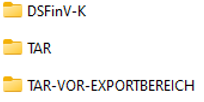
Table and field overview
The most important tables in the export (depending on the procedure, additional tables may be included):
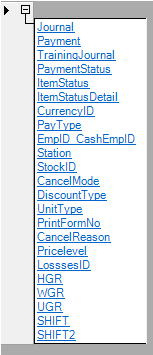
| Table | Description of the |
|---|---|
| TrainingJournal | Course bookings (empty if no course bookings exist). |
| Payment status | Status of the payment (disbursement, tip, etc.) |
| ItemStatus | is documented separately |
| ItemStatusDetail | Additional information on the ItemStatus |
| CurrencyID | Currencies used |
| PayType | Type of payment (cash, credit, etc.) ) |
| EmpID | staff |
| station | stages |
| StockID | points of sale |
| CancelMode | Void variants |
| DiscountType | Discount variants (item, transaction, etc.) ) |
| UnitType | Types for unit sales (time, weight, volume, etc.) ) |
| PrintFormNo | Forms ( invoice printing ) |
| CancelReason | Void reasons |
| PriceLevel | price levels |
| LossID | reasons for loss |
| HGR/WGR/UGR | Main groups / Commodity groups / Subgroups |
| SHIFT/SHIFT2 | shifts |
| RefStatus |
Reopening status: 0 normal transaction, 1 credit, 2 credit. |
CancelModes (cancellation system)
0-99: Cancellations in regular checkout operation.
100-199: Cancellations with "Change payment method".
200-299: Cancellations when reopening transactions (ReOpen).
Further topics: Hypersoft procedure for cancellations
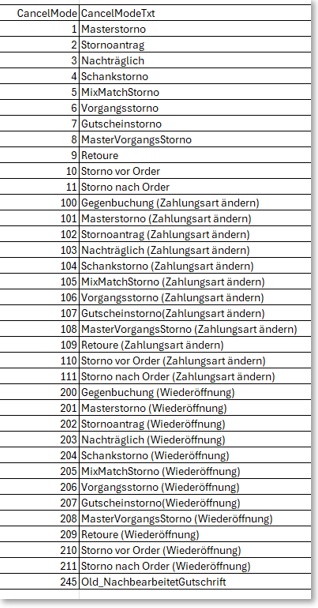
Example:
10 = Cancellation before order
11 = Cancellation after order
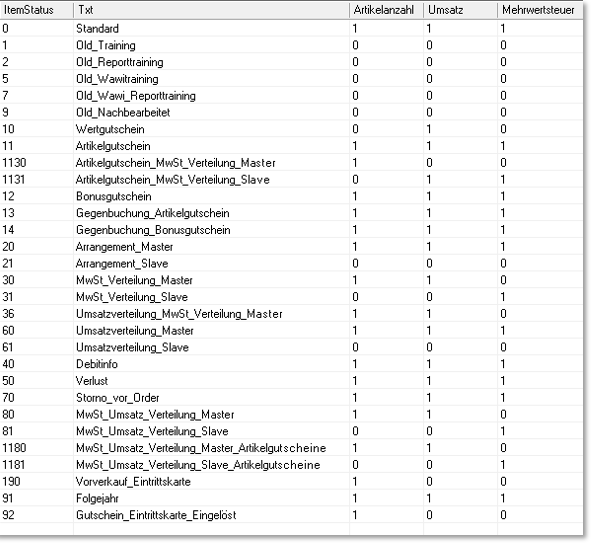
ItemStatus codes
Define the sales relevance of a booking and any additional information.
- Cancellations with cancel mode IDs from 0-99 were carried out during regular checkout operations
- Cancellations with cancel mode IDs from 100-199 were carried out using the Change payment method function
- Cancellations with cancel mode IDs from 200-299 were carried out using the ReOpen function (reopening of processes)
Here it is useful to understand that there is a systematic relationship between the ID numbers. Each ID number below 100 has a comparable counterpart in the number ranges between 100 -199 and 200 - 299.
Further topics: Special price and loss treatment
Evaluation logic & field interpretation
The legends are provided in German.

Example: Legend_Table_Journal...
| ID | Unique key number |
|---|---|
| TransactionID | unique index to the process and link to the other tables |
| station | Station number (cashier station) |
| OriginalStation | Station number (booking station) |
| SysDate | System date of the computer Format =YYYYMMDTT |
| etc... |
Calculate daily turnover
Only data records in Journal.csv for which VatTab > 0 are relevant to sales.
Bookings with VatTab = 0 are not relevant to sales.
Daily turnover per opening day (OpenDate) = Quant × Price for all turnover-relevant items.
Item status codes not relevant to sales
1, 3, 5, 7 = training bookings (up to Hypersoft Suite 2012 SP 60)
9 = Conversion of old reopened data (up to Hypersoft Suite 2012 SP 60)
10 = Revenue-neutral value voucher (also web voucher)
11 = item voucher
12 = Bonus voucher
30, 31 = VAT distribution additional info (sales-relevant data record is 31)
36 = Sales distribution additional info (sales-relevant data record is 31, can be combined with sales mix)
60, 61 = Sales distribution Additional information
80, 81 = Combined VAT and sales distribution (since HF 11 / SP 11 2020)
90, 92 = Internal bookings without turnover (special function advance ticket sales)
Example: Sales mix with multiple tax rates
Status 30: Menu complete, full retail price.
Status 31: Partial turnover for 19% tax share (e.g. beverage).
Status 31: Partial turnover for 7% tax share (e.g. food).
Interpretation:
Status 30 → for quantities and sales calculation.
Status 31 → for tax calculation per tax rate.
Distribution of sales by product group
An article can be assigned to several product groups.
The NH_ProzValue field contains the distribution percentages.
See ItemStatus table for definitions.
Legend of tables and fields
Further topics: Splitting of turnover and value added tax
Examples:
ID - unique key number.
TransactionID - unique transaction index, link to other tables
Station - Station number (checkout station)
OriginalStation - Booking station
SysDate - System date in the format YYYYMMDD
(complete field list included in the export as a separate legend file)
Recognising related transactions within the scope of the facilitation rule
When the facilitation rule is applied (e.g. in the catering industry for so-called through-service), each individual order transaction is completed immediately after saving in the TSE, although the corresponding table or transaction remains open in the POS system until settlement.
The billing area column is used so that these technically separate order transactions can be recognised as a related business transaction in the subsequent export.
Structure of the payroll area value:
The entry follows the format:
Table-<table number>-<usage counter>-<document ID>
Meaning of the components:
Table number = number of the table from the POS system
Usage counter = consecutive counter per table, starting at 1 with each Z completion
DocumentID = unique document number of the order process (corresponds to the internal TransactionNr)
Example:
Tisch-12-3-10004711-01
→ means:
Table 12
third use of this table in the current daily closing
related document: 10004711-01
This format makes it clear to third parties - especially auditors - which order transactions belong to a table, even if they have been completed and TSE-signed individually.
Restriction:
Using specialised processes such as transfers or split postings, individual posting items from an originally signed order transaction can be transferred to another transaction and billed there. In these cases, the accounting area remains clearly traceable at transaction level; an item-specific payment allocation across transaction boundaries cannot be consistently represented in the standardised DSFinV-K export due to the system.
Further topics: Facilitation regulation for through service
Hypersoft updates in the journal

Each booking contains the version number of the programme version.
For important updates, a placeholder is inserted in the journal to make the version separation visible.
Example: 2014 080 00 → year 2014, service pack 080, revision 00.
Version history incl. changelog see: Hypersoft news.
Technical formats
Decimal values: Always point as separator (country setting independent).
Schemas: Each XML table is accompanied by an .XSD file that defines the data types.
Date: ISO 8601 (YYYY-MM-DD), strictly numeric.
Special features of DSFinV_K
Master data history (changelog.csv) documents changes to relevant master data (e.g. articles, employees, price lists).
TAR folder contains all TSE log files for the period.
TAR PRE-EXPORT RANGE can contain additional signatures from the previous month.
Further topics:
DSFinV_K Export - Instructions & file structure
GDPdU Export - older test procedures
Journal for statistics - filters & formats
Back to the overarching topic: Audit-relevant exports