eSolution Payments - Online and POS
eSolution payments relate to transactions that are transmitted from the eSolutions area (e.g. web shop, app, self-order) to a location. These are often orders that have already been paid for in advance. In practice, however, it is just as common to accept payments only on collection or delivery or to sell additional items in the course of the handover.
Upselling situations occur regularly, especially during pick-ups: a prepaid transaction is opened, a drink or dessert is added and a new balance is created. In exceptional cases, it may also be necessary to make cancellations or refund partial amounts - for example, if items are not available or orders are changed.
Basic principle: payment and conclusion are not the same thing
An eSolution payment does not finalise a transaction. It merely reduces the outstanding amount.
The process itself is always completed at the location's POS system. It is precisely this principle that ensures that even complex processes - advance payment, subsequent booking, partial cancellation or payout - are processed correctly, comprehensibly and in a tax-compliant manner at all times.
This is shown transparently on the receipt:
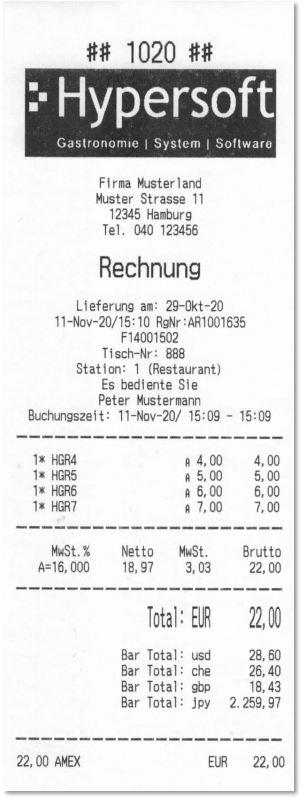
For example, a fully prepaid transaction shows the total amount and the corresponding online payment (e.g. "Total €22.00 - AMEX €22.00"). If additional items are subsequently posted or amounts are cancelled, the remaining balance appears accordingly on the receipt and can be cleared or paid out at the location.
The visual representation of the totals can vary depending on the form template used (e.g. upper or lower case): Form setting Total in upper case
Payments and repayments when closing transactions
Transactions that are transferred from eSolutions to the POS system can be opened there at any time - even if they have been fully prepaid. The contract is always concluded via the POS.
If a prepaid transaction is finalised at the POS using the cash register function, this action is used exclusively for finalisation. The original payment method remains unchanged. In this case, the cash button does not act as a new payment, but as a closing logic.
If there are subsequent bookings - for example due to additional items ordered on collection - the new remaining amount can be paid using all payment methods available at the POS. The same applies vice versa for cancellations: If a credit balance is created, this can be paid out at the time of closing, provided the respective payment method supports payouts. Which payment methods make this possible depends on the system used and should be tested on site in advance.

Best practice for handling eSolution payments
The combination of eSolutions and POS is powerful but complex. Best practice therefore means above all: creating a routine.
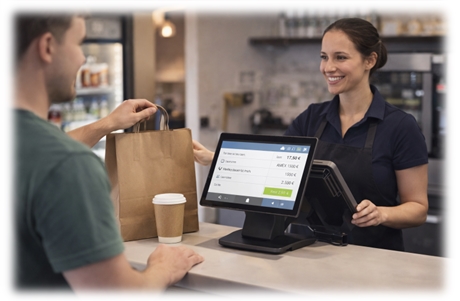
Train your employees specifically in the completion of eSolution transactions. It should make no difference to the operator whether a transaction has been paid for online in advance or not. The process remains calm, confident and comprehensible.
For pick-ups in particular, it is advisable to provide targeted upselling opportunities - in line with your company's concept. A clearly positioned drinks fridge, desserts or additional products make additional sales considerably easier. The decisive factors for a positive guest experience are not technical details, but reliable processes and experienced staff.
Even more important is dealing with exceptional situations with confidence. Cancellations due to unavailable items can be largely avoided with good availability management. If they do occur, genuine alternatives should be offered and it should be possible to pay out any credit balances without complications. Any unnecessary escalation ("get the manager first") worsens the experience.
Best practice means here:
clear processes, clear responsibilities and practised handling - so that eSolution payments are not conspicuous, but simply work.
Back to the overarching topic: payments