GDPdU Export - older test procedures
Purpose of this export
GDPdU export (also known as GoBD export) is the former standard procedure for providing electronic cash register data for tax audits in Germany.
Although the Cash Register Security Ordinance (KassenSichV) now stipulates the DSFinV_K export as a mandatory procedure, many auditors continue to use the GDPdU export as a supplement to obtain additional or familiar information.
When to use this procedure
If auditors explicitly request a GDPdU export.
As a supplement to the DSFinV_K export to provide analyses in the usual format.
For internal comparisons with older audit data.
Procedure
-
Open dialogue
-
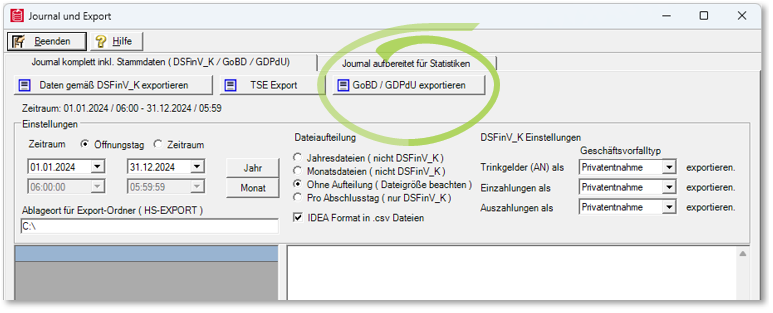
Menu path: Journal export → DSFinV_K / GDPdU / AmadeusVerify Export
-
Select the GoBD / GDPdU Export button.
-
Set time period. Opening day (start date to end of day) or exact date range. For establishments with opening hours after midnight, pay attention to overlaps. In the event of overlaps (operation after midnight), adjust the time period accordingly.
-
Determine storage location
-
Default folder: /HS-EXPORT/GDPdU/<period>/. File name is automatically generated from client and period.
-
Start export. Depending on the amount of data, the process can take several minutes.
File format
XML files with all relevant movement and master data.
index.xml contains the overview and can be read directly by testing software.
Table structure largely corresponds to the DSFinV_K export, but without TSE signatures.
Special features
Contains some fields that auditors cannot directly extract from the DSFinV_K structure.
Also supports auditing with Audicon IDEA and AmadeusVerify.
Can be generated in parallel to the DSFinV_K export.
Best Practices
Always provide GDPdU export together with DSFinV_K to enable a complete check.
Ask the auditor in advance whether the GDPdU format is preferred or additionally required.
Check the export yourself with AmadeusVerify or IDEA before handover.
Further topics:
DSFinV_K Export - Instructions & file structure
Back to the overarching topic: Audit-relevant exports