Pay machine S2 SB-cash register

The RossMann company offers different types and housing variants of automatic payment systems, so that payment solutions can be integrated into your salesrooms in the best possible way. Whether small or large company, whether a lot or little space, RossMann equips you with the suitable machine as a floor-mounted or built-in unit. Example: S2 payment machine as a floor-standing machine:
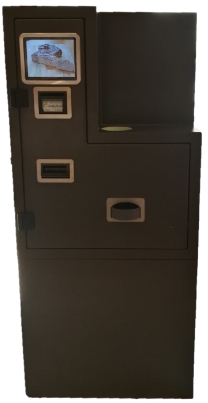
Flexible secure design
4mm steel housing with VDS lock
Equipment variants:
Floor unit (two-part with integrated base)
Tabletop unit for mounting on the counter or integration into the shop fittings
Weight between 80 and 160 kg
Vandalism-proof installation EC-Terminal
or EC unit mounted on a mounting arm e.g. P400 from Verifone
80mm built-in printer in the lower part with paper retraction for non-peeled documents, larger roll and large memory for retracted paper. Therefore long trouble-free operation
To the RossMANN website: http://www.rossmann-systeme.de/new/index.php/bezahlautomat
Hypersoft annotations
It is an innovative and particularly intelligent concept, as the payment machine also includes a multifunctional Tablet PC. This acts as a customer display in cashier mode, but is also used for service purposes such as replenishment and skimming. Faults are also communicated safely and largely self-explanatory, as this does not have to be done via an interface as with other systems. Another special feature is the possibility of connecting an EC terminal directly to the tablet, so that your customer can freely choose between payment at the machine or at the payment terminal.
Set up Hypersoft self-service checkout integration
The payment machine is connected to the Hypersoft POS system using the RoPay program from RossMann.
In ward management, select - Edit ward under External interfaces. Select the type RoPay there.
RoPay requires 2 directories for communication.
- InFile Directory for the transfer from Hypersoft POS to RoPay.
- OutFile Directory for the reply from RoPay Hypersoft POS.
Define a data exchange directory for communication. The Hypersoft POS creates subdirectories \IN and \OUT (if RoPay is activated).
In RoPay you configure equivalent:
Example in Hypersoft: C:\Cash machine
then in ropay:
C:\Cash Machine\IN
C:\Cash Machine\OUT
Checkout process
The Hypersoft POS system creates the payment method CashCONTROLLER, which can be used in cashier mode. With the payment method CashCONTROLLER the device is requested to collect or return the amount. Depending on whether the posting was positive or negative. RoPay takes over the payment order and returns the result to the cashier.
With RoPay no partial payment or multi payment is possible. Although the machine can offer several payment options, it cannot be used for multi-payment: CASH, CREDIT, VOUCHER, BLUECODE
All other functions that Hypersoft makes available with the CashCONTROLLER are not supported, as these are directly available in the device (see above).
licenses
To use it, your system must have one CM SB cash register interfacefrom Hypersoft.
Back to the overarching topic: Hypersoft POS Connections