Things to note about bar connections
Explanations of terms and background information on dispensing technology:
Over-consumption refers to consumption quantities that cannot be offset against cash register entries. These can arise, for example, through the permitted pre-tapping mode on the dispensing system. Example: 20 items consumed at the dispensing system and 19 items booked at the cash register. This means that a cash entry is missing. The number of consumptions exceeds the number of bookings.
Undersupply refers to loans that are still available for consumption at the dispensing system. This can occur, for example, if consumption quantities are set too generously. Example: 20 x booked at the till and 19 x tapped (but 20 portions produced). The amount consumed is less than the amount of credit.
Evaluations and completion of the dispensing system
Over- and under-consumption can be booked to a table number when closing the dispensing system. With the Close table option, you can determine whether the table should be closed automatically. If no table number is entered for this in the Hypersoft settings for the area, the bookings will be booked to the respective server number + virtual table number offset for table 0. Such tables are not automatically closed by the Close Table option.
Daily settlements...
The daily closing can be carried out with the manager user authorisation either directly from the cash register with the cash register function 977 + Execute or from the dispensing system interface view with the Delete credits button. You can also carry out the closing directly at the dispensing system with the Delete credits command (example for Gruber dispensing systems). Further information can be found in the chapter Dispensing interface in cashier mode.
Evaluations in the Report Manager
The Report Manager contains a section with several reports for evaluating the dispensing systems and their bookings. Please refer to the Report Manager T Dispensing System for this.
Best practice: Use pre-tapping mode deliberately
Modern dispensing systems offer two basic control modes:
-
Portion-by-portion release via solenoid valve per booking
-
Permanent flow with pure volume measurement (pre-tap mode)
In theory, releasing portions at a time offers maximum control. In practice, however, it often clashes with the reality of running a restaurant.
Reality in ongoing operations
In a normally frequented establishment, regularly tapped beers are placed on the drip tray. The dispensing process is not an isolated individual process – it is part of a continuous workflow.
If the solenoid valve is permanently open, the portion-by-portion release loses its practical use; it becomes a formal control without any real control effect. In the worst case, it can even hinder the service.
Why pre-tapping mode can be useful
The so-called pre-tap mode dispenses with the portion-by-portion valve release. Instead, only the flow rate is measured and evaluated. This creates operational flexibility:
-
In the event of a sudden rush of guests, drinks can be pre-poured.
-
Spontaneous reproductions (e.g. in the event of a knocked-over glass) are possible without system blockage.
-
The service flow remains uninterrupted.
-
Responsibility is shifting from mechanical blocking to downstream evaluation.
Control through evaluation rather than restriction
In pre-tap mode, control options are available via:
-
over-serving
-
undershelf
-
Loss postings
-
end-of-day valuations
Management assesses these key figures in the context of day-to-day business. This does not control the tapping process – but rather the result. In practice, this form of control is often more effective than technically enforced individual portioning.
Business principle
Technical limitations are no substitute for leadership. If a system hinders the flow of services and regularly requires manual intervention, this does not result in greater control – but rather operational friction. A well-organised pre-tapping mode combines:
-
flow measurement
-
transparent evaluation
-
clear responsibilities
-
regular assessment
-
This keeps operations running smoothly –
-
and controlling meaningful.
Recommendation
Activate the pre-tap mode where:
-
continuous dispensing takes place
-
Service speed is crucial
-
clear daily valuations are established
Rely on measurement and evaluation – not on rigid approval logic.
Tapping beer
When tapping beer, it can be poured with a tolerance. The resulting deviation remains in the dispensing system as a credit per beer.
This credit is treated differently depending on the manufacturer:
With some dispensing systems, it can be cancelled via a confirmation button (e.g. "all beers ready").
Other dispensing systems automatically delete the tolerance the next time the corresponding drink is booked.
If you would like to pre-tap beers, these can be booked to a virtual table number in the Hypersoft POS system and cancelled at the end of the day.
Solution:
Dirmeier and Gruber dispensing systems support tapping via the so-called pre-tapping mode. An operator may first tap into the minus. This minus is automatically offset against subsequent bookings.
Subsystem for preferential processing
As a rule, a POS subsystem is used for communication between the POS and the dispensing system. The POS subsystem initialises the dispensing system and continuously monitors the debit-side postings triggered there. These are automatically assigned to the respective table processes.
Example:
If a drink is tapped for table 1 at the dispensing system, the subsystem recognises the booking and automatically assigns it to the corresponding table operation.
Monitoring takes place cyclically once a minute. One table operation is processed per cycle.
In addition, every time a table transaction is opened in the stationary POS, the system checks whether there are still open bookings from the dispensing system for this table. If such bookings exist, they are transferred directly to the table process.
The mPOS system does not support this type of check, as there is no direct integration with the dispensing system for the booking transfer when a table transaction is opened.
A preferred subsystem can therefore be defined as an option, which takes over this task centrally and significantly speeds up processing. In this case, all outstanding bookings of the dispensing system are immediately assigned to the respective table transactions via the preferred subsystem.
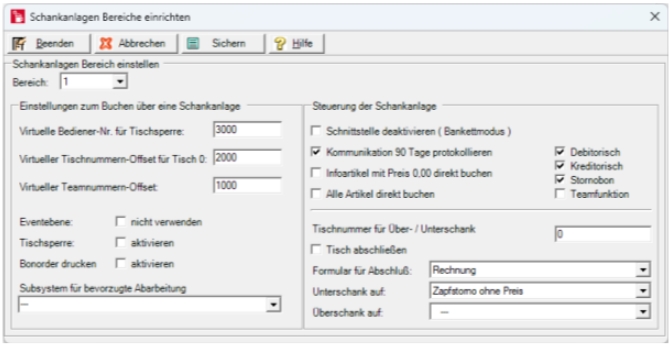
Important to note:
-
Only one subsystem can be used per dispensing system area
-
The subsystem runs explicitly for the dispensing system connection. It may not be used for other bookings, mPOS, Smart Swap or similar.
-
The dispensing area, the point of sale and, if necessary, the entry price level must be stored in the subsystem. Just like the station that starts the subsystem.
Known limitations of dispensing connections
Dispensing systems are powerful tools for supporting service and control. However, they are no substitute for a comprehensive controlling system. Despite sometimes considerable investments, there is occasionally an expectation that a dispensing system will completely cover operational and organisational processes. However, there are systemic limitations in practice. When properly planned and neatly integrated, dispensing systems make an efficient contribution to:
-
quantity recording
-
process acceleration
-
consistent quality
-
Transparency in serving
This requires a coordinated configuration – ideally in cooperation with the cash register partner.
1. Debit entries and function numbers
In dispensing systems, orders are often transmitted via function numbers. A function number can be assigned to several items in the POS system. However, if a booking is received from the dispensing system, it can technically only be assigned to a single item. In this case, the system uses the first matching item in the item master.
Recommendation
For debit entries from the dispensing system, use only clearly assigned function numbers. This is the only way to ensure accurate item allocation.
2. Display in the transaction overview
It may happen that an operator opens the table overview before all bookings from the dispensing system have been fully processed. At this moment:
-
the table is already shown as occupied
-
However, the corresponding sum has not yet been calculated.
-
Therefore, placeholders appear in the overview instead of specific amounts.
This status is due to technical reasons and will automatically disappear once the bookings have been fully processed.
3. Limited table number ranges
Depending on the manufacturer and year of manufacture of the dispensing system, only limited table number ranges are available. Examples of older series:
-
WMF: three-digit table numbers
-
Gruber: four-digit table numbers
These restrictions are taken into account by the system, but must be planned for in terms of organisation.
Recommendation
Assign fixed areas to operators.
This will help you avoid conflicts in the table number room and establish clear responsibilities.
4. Table locks and time transfers
The table lock is intended to ensure that a transaction is processed exclusively by the operator who booked it first. However, depending on the dispensing system, the block is only transferred to the POS system when the first item is booked. Between the time the table is opened and the actual booking transfer, another operator may have already reserved the same table in the POS system.
Special feature: Habimat (old series)
Such Habimat dispensing systems do not support table locks as a matter of principle. In this constellation, organisational clarity is particularly important.
5. Bookings without a valid table number
Some dispensing systems allow bookings without requiring a table number to be entered. To ensure that these bookings are not lost, they must be assigned to a transaction in the system.
Solution: Table number offset
A table number offset can be defined in the "Dispensing systems – Set areas" dialogue box.
The offset adds the operator number to a fixed value and uses this to generate a virtual table number.
Example: Offset: 800
Operator No. 12 books without a table → The system automatically generates table 812.
The bookings are collected there and can then be transferred or invoiced.
Important: Without the table number offset activated, corresponding bookings will be rejected.
Recommendation on organisation
-
Use the graphical table overview (draw places for the offset tables)
-
Set up a separate area for offset tables
-
Define clear operator responsibilities
-
Coordinate table areas across systems
principle
Dispensing systems are precise measuring instruments, but they do not possess organisational intelligence.
Stable integration is achieved through:
-
unique item assignment
-
clear table logic
-
defined responsibilities
-
deliberately set system parameters
Technical limitations can be planned for – unclear organisation cannot.
When using a Gruber/Dirmeier dispensing system, the team function can be activated in the interface in order to utilise the full range of functions in the network.
Please note:
The dispensing system does not have a serving area.
Access conflicts during teamwork
If a team member at the checkout books a table outside their transaction area, this operator is given responsibility for the transaction. Other operators without the appropriate authorisation cannot open this process.
However, the dispensing system cannot differentiate this restriction and allows any team member access. If a booking is made for an unauthorised transaction, the dispensing system connection intervenes and transfers the booking to the virtual table number offset of the operator making the booking.
New table outside the process area
If a team member creates a new table at the dispensing system outside the operation area, the dispensing system connection checks the authorisation:
Authorisation available:
The operator is given responsibility for the process.
The bookings are not assigned to the team.
No authorisation:
The bookings are transferred to the operator's virtual table number offset.
The operator cannot open the transaction at the cash register because it is outside the transaction area.
In this case, the table remains blocked in the dispensing system, although no corresponding transaction exists in the POS system.
An operator must open and lock the locked table (usually without bookings, as these have already been transferred) once so that the dispensing system releases the table again.
Further topics: Team function and banquet function
Serving alcoholic beverages – physical limitations of time-controlled systems
Time-controlled spirits dispensers operate on a simple principle: a defined opening time should result in a defined quantity. In practice, however, this assumption is only accurate under constant conditions. As we have gained experience in using these devices in our inventory management, we would like to share some of our insights with you.
Influencing factors in real operation
Several physical factors influence the actual amount dispensed:
1. Temperature
The viscosity of a spirit changes with temperature. Chilled or frozen drinks flow more slowly. Room temperature drinks flow faster. If the dispensing time is set at one temperature but later used at a different temperature, systematic deviations will occur.
(If bottles are very cold, condensation may freeze on the valve and alter the flow rate.)
2. Level of the bottle
The fill level also affects the flow rate: a nearly full bottle generates higher pressure. An almost empty bottle reduces the flow. This means that different quantities can be served during the same opening hours.
3. Design and system environment
Depending on the type of spout, pipe length and installation situation, further differences may arise. Time-controlled systems are therefore not precision instruments in the physical sense, but rather practical approximations.
What does this mean in practice?
Time-controlled dispensers can work very well under stable conditions. The prerequisite is:
-
Setting at actual selling temperature
-
Regular checks
-
Awareness of influencing factors
If it is assumed that the time set once will remain accurate permanently, unnoticed deviations will occur.
Alternative control methods
Additional checks may be advisable, particularly in the case of high-quality or high-margin spirits. One option is to determine the quantity using a Hypersoft-compatible digital scale. This method measures independently of:
-
temperature
-
viscosity
-
level
-
pressure conditions
It is part of the Hypersoft control concept and is used for precise reference checking.
Business principle
Technology supports the process – it does not replace an understanding of physical relationships. If you want to control the serving of spirits precisely, you should:
-
Set up systems correctly
-
Keep framework conditions stable
-
Check deviations regularly
-
This allows for control without affecting guests.
Further topics:
Best practice for inventory management
Drawers and shelves with control function
Drawers and shelves that record the consumption of goods by reducing their weight can be a useful addition. Nowadays, this technology generally enables long-term reliable operation - even when dispensing in portions.
Clarify in advance:
-
the number of different items per drawer,
-
the actual space requirements,
-
and the fact that goods usually have to be replenished several times a day.
Solution:
Let us advise you on calculating your requirements and use Hypersoft just-in-time delivery to optimally stock your points of sale.
Frank dispensing systems SCU limitations
The Franke SCU interface supports:
no cancellations
no table locks
These restrictions must be taken into account during planning and operation.
Back to the overarching topic: Connection to dispensing systems