ePOS mobilePRO Questions & Answers FAQ

With these versatile mPOS solutions, mobile devices such as smartphones, tablets and other mobile devices can be linked to a fixed payment terminal (POS) so that transactions can be processed regardless of the service staff member’s location. A basic distinction is made between the standard mPOS system and the mPOS client-server / mPOS Freestyle UX system.
-
Standard mPOS includes professional Windows-based devices such as the ‘Orbit’, ‘Orbit NEXT’ or ‘Sonic’ (mPOS handheld) and the ‘Hypersoft Tablet //4’ (ePOS tablet), which are specifically designed for the hospitality industry.
-
Client-server mPOS allows you to work from payment terminals (PayPOS) as well as Android and iOS devices (Freestyle UX or mPOS Client). Freestyle UX is the flexible solution that allows you to connect up to 22 devices to a single payment terminal. The mPOS client version, on the other hand, is set up once on a single device for a specific purpose.
Further topics: mPOS Client Questions & Answers FAQ.
Error messages
- Own locked transaction / table: The mobile device establishes a connection to the POS server and records the transaction. When the transaction is closed (either by invoicing or by updating the balance), the mPOS programme terminates this connection. If the device is switched off beforehand, or if it is simply 'put down' whilst the operation is still in progress, or if you leave the wireless range beforehand, the operation will continue to be recorded unintentionally. The mPOS system usually corrects this error within about three minutes.
- An external device records the process: see the previous section. However, it may also be a payment transaction that has been sent to an (EC) payment terminal linked to a till and has not (yet) been completed there. This is usually corrected automatically within a few minutes. In very rare cases, the main cash register or the server may need to be restarted (please contact our support team regarding the latter).
-
Server not responding during start-up: Please check whether Hypersoft Kasse or the mPOS server is installed on the device, and whether Hypersoft mPOS UX is installed on the terminal. In addition, the entire POS infrastructure must be on the same network as the device performing the search.
-
The device has frozen: this could be due to a number of factors affecting the system. e.g. a weak Wi-Fi signal or outdated hardware used with the devices (often due to poor cabling). If necessary, you can perform a reset by swiping two fingers across the screen from left to right.
General questions about the mPOS system
 Where exactly can I find the specifications for the mobile devices available from Hypersoft?
You can find detailed specifications under POS Mobile handhelds.
What is the difference between Freestyle UX and mPOS client-server?
With mPOS Freestyle UX, you can connect up to 20 devices at the same time (even on the fly), without the need for complex configuration or individual licences.
Is Hypersoft Freestyle UX compatible with my smartphone?
Please check the whitelist table to ensure compatibility.
How do I give the customer a receipt?
Using a receipt printer and/or digital receipts with NoCOO - Digital Billing.
Can I also scan loyalty cards or vouchers using the mPOS devices?
Yes, depending on the model, you can activate the camera function on the mPOS and scan customers’ QR codes or barcodes, or voucher cards.
Can I use mPOS in conjunction with the Kitchen Monitor?
You can use the Hypersoft Kitchen Monitor System or the QSR Kitchen Monitor System.
What is the difference between Quick Mode and Simple?
Press and hold the CAM button to start Quick Mode. Quick Mode allows you to open transactions for quick processing without the entries being transferred to your mobile device.
The mPOS Simple Order can be configured flexibly and also allows the operator to post orders to a specific table and process payments at the touch of a button.
Can external cameras be used with the CAM function?
Every standard till (Lifestyle 2) has a built-in camera, which can be activated via a shortcut on the hardware and viewed using the mPOS Cam function. However, you can also use other USB cameras. IP cameras are not currently supported.
Is it possible to switch the display from landscape to portrait on the ePOS tablet?
No, the mPOS tablets (landscape format) and mPOS solutions (portrait format) are fixed. You could install an mPOS client on a tablet, but the interface would appear very large, as it is designed for smartphone screens.
Is there a way to analyse the sales figures from the mPOS devices separately?
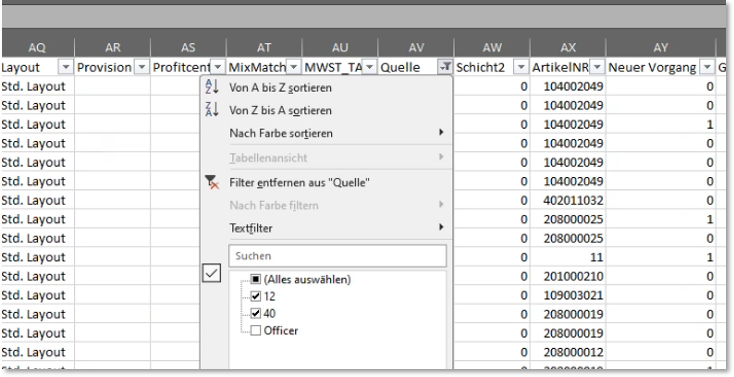
As a general rule, operator transactions can be used for this purpose if the operator names allow you to identify the mPOS devices. However, if staff members switch between working at the POS and the mPOS, things get complicated, as the mPOS devices run as a subsystem on a main till and do not have their own station name. As a temporary solution, you can export the journal and use a filter in Excel to sort the sales figures by POS and mPOS. In the 'Source' column, '40' refers to Clou Mobile transactions (mPOS transactions) and 'Officer' refers to POS transactions (the '40' can be disregarded in this example).
Questions about Wi-Fi
You can expect 100% uptime and fast response times from a properly configured system free from external disruptions. Here are some tips if you encounter an error:
- Please refer to the section WLAN Notes and Mobile Device Practice.
- If your staff regularly have to leave the radio coverage area (e.g. to go to the kitchen), this may cause interference. Make sure to install Wi-Fi in these areas too, so that devices remain connected at all times whilst in use.
- Make sure the antennas are positioned correctly. Bear in mind the impact of human bodies when installing and testing in an unoccupied building.
- Do not use systems that are overly complex in terms of technical redundancy. Try disabling such redundancies.
- The clock should be set correctly; please ensure there are no time discrepancies between the mobile device and the IIS device (server).
- If you’re experiencing problems at the edge of your Wi-Fi range, it can help to ensure your body isn’t positioned between your mobile device and the receiver; try holding the device at an angle.
What does the message 'Connection problems' mean?
If the wait times for the Wi-Fi connection exceed the set tolerance, the mPOS Handheld Connection Service will be launched.
How do mPOS and mPOS client-server differ in terms of data traffic?
Both systems mainly run over Wi-Fi, although a LAN connection is also possible (ePOS tablet). The mPOS system stores master data and transaction records locally on the device and can therefore be used temporarily without a wireless connection to collect transaction records (a connection is required to send or use the transaction records). The mPOS client-server system uses the server’s user interface and data, and requires a strong, uninterrupted Wi-Fi connection; otherwise, no entries can be made. The system sends graphics and coordinates rather than data, which is why it transmits significantly more data.
Questions about mPOS Freestyle
When using the mPOS Freestyle UX, I get the message ‘No UX authorisation’. What’s wrong?
Although the rejected server is recognised in Hypersoft, they have not completed an mPOS Freestyle registration themselves. Please note that mPOS Freestyle rejects "external" operator logins.
Questions about configuration
How do I configure the mobile devices in a POS network?
In the standard setup, a subsystem is set up on the server (on the main till) and configured with the terminal settings required for the mPOS system. In addition, there are many settings available within the mPOS system itself, and you also have the option to use SmartSwap. As a rule, a single subsystem controls all mPOS devices.
If it is deemed absolutely necessary, you may, as an exception, install more than one IIS instance in order to use multiple independently configurable mPOS systems within a single tenant.
Questions about PayPOS
I use mPOS directly on a payment terminal; can I disable the prompt for the payment terminal when making a payment?
Yes, please read PayPOS fixed payment terminal assignment.
Hardware
Top topic: How can I pair Bixolon belt printers with PayPOS payment terminals?
Pairing is only possible using special drivers and in accordance with the instructions. See: Pair Bixolon Bluetooth Belt Printer
Which mobile devices are best suited for use as a mobile till from 2022 onwards?
Use the new Rocket as a professional Android device, or one of our payment terminals with PayPOS. In certain situations, you can also use standard Android devices in smartphone or tablet form.
"Should I use a Bluetooth or Wi-Fi printer?
Bluetooth printers are usually better, as the wireless connection directly from the mobile device to the printer is much shorter, more reliable and faster. Please note that, when using CLOU MOBILE for Windows and the mPOS system, a mobile printer must be available for each mobile device; this is because, in the event of print redirection or for devices that do not have their own printer, all print jobs must be statically redirected to the same fallback printer. This is because the printer control from the mobile device does not respond as flexibly as it does from the POS system. The POS system controls the Wi-Fi printers and can be configured in greater detail to deal with 'missing' or faulty printers.
Back to the overarching topic: Hypersoft mPOS