
ePOS mobilePRO

Hypersoft ePOS mobilePRO

ePOS mobilePRO is the next generation of mobile POS systems from Hypersoft and the direct successor to the established mPOS.

The system incorporates the tried-and-tested features of the mPOS and continues to develop them further. The aim is to achieve significantly more stable, flexible and future-proof mobile POS usage – both in standard Wi-Fi environments and in scenarios with fluctuating or challenging network conditions.

The technical infrastructure has been thoroughly modernised. ePOS mobilePRO utilises state-of-the-art communication technologies and is designed for continuous, real-world operation in a wide variety of environments – from fixed-location businesses to mobile or hybrid sites.
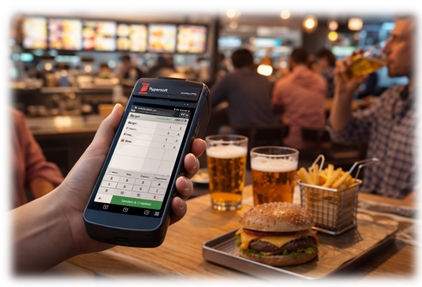
A key improvement is the enhanced connectivity:

For the first time, a Hypersoft mobile POS system supports both Wi-Fi and mobile network connectivity (SIM card). This means that devices can be used with much greater independence from the local infrastructure.

The following applies to existing users:

The basic operating logic and range of functions are modelled on the mPOS. For details on established procedures, please continue to refer to the existing documentation: Hypersoft mPOS

Technical overview: Hybrid mode (Wi-Fi & mobile)

With ePOS mobilePRO, a hybrid communication concept is now available for the first time, enabling parallel or alternative operation via Wi-Fi and mobile networks.

basic principle

In hybrid mode, the system can make flexible use of network connections to ensure stable communication. This is particularly relevant in the following scenarios:

unstable or overloaded Wi-Fi infrastructure

mobile locations (e.g. outdoor dining, events)

Reliability in the event of network failures

Current status of implementation

The first technical implementation of hybrid operation will take place in the area of cashless payments (Adyen terminals).

To activate:
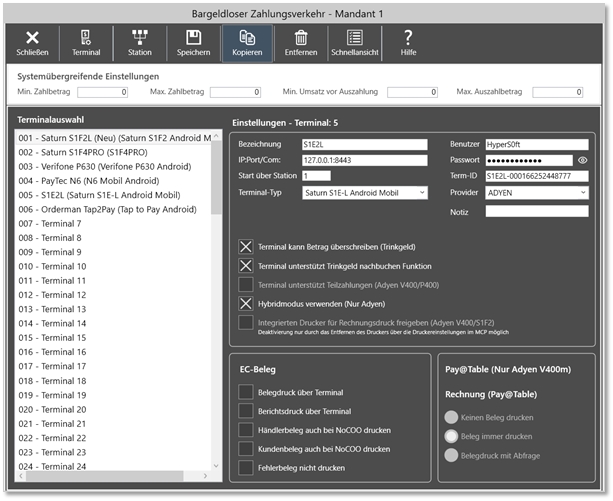
Enable the “Use hybrid mode (Adyen only)” option

Set the IP address to 127.0.0.1:8443

This setting enables the use of hybrid mode for terminal communication.

Classification

Hybrid mode represents a significant step towards highly available mobile POS systems. The functionality is set to be extended to other areas in the future.


Best Practice Hypersoft POS and ePOS mobilePRO

Best Practice Categories Best Practice Theme

Hypersoft POS and mPOS in general

automation Best practice: Key removal closes process - fast, secure, proven
automation Best practice: Automate daily closing - control instead of headaches
item master Best practice: Use layout templates for articles - faster booking, fewer errors, clear structure
Revenue, investment security Best practice: Utilise purchase prices consistently
Workflow, customer satisfaction Best practice: Messages to operators - small messages with a big impact
Workflow, customer satisfaction Best practice: Only prohibit the closing of third-party tables - not ordering!
Workflow, customer satisfaction Best practice: Visual order receipts for error-free customisation
Workflow, customer satisfaction Best practice: Actively manage article availability
QM, external presentation Best practice: Clear labelling for pick-ups and deliveries

Control

Control/Fraud Best practice: checkout security starts with the lock
Control/Fraud

Best practice: Working as an operator - targeted corrections with a system

Best practice: Phantom mode - spontaneous support without taking control

Control/Fraud Best practice: Real-time control instead of follow-up control
Control/Fraud Best practice: No fax in the kitchen - clarity instead of codes on receipts
Control/Fraud Best practice: Fraud prevention with cash drawers
Control/Fraud Best practice: Handling change securely in Quick Service
Control/Fraud Best practice: Classify cancellations correctly - informative or with loss of goods
Control/Fraud Best practice: Booking tips - correct, secure, tax-compliant
Control/Fraud Best practice: Cash shortage through cashless tips
Control/Fraud Best practice: Protection against "false invitations"
Control/Fraud Best practice: Fraud protection with wallet control
Control, Operations Best practice: Selling valuable wines - precision protects sales and guest confidence

Operations

Public image, operations Best practice: Using pro forma and NoCOO documents correctly and avoiding misunderstandings
Operations Best practice: provisionally close processes
Operations Best practice: using change in a structured and traceable way
Operations Best practice: Automating change with wallet control
Operations Best practice: Targeted use of double vouchers
Operations Best practice: In house / out of house - clean system separation
Operations Best practice for blanket information exchange between multiple items
Operations Best practice: Record the number of customers correctly

Payment

Employee and customer loyalty Best Practice: Hypersoft Pay Direct Tipping
Cashless Payments Best practice: Correctly carry out payment corrections and cancellations for cashless payments
Cashless Payments Best practice: Protection via the Internet connection - not via the terminal
Cashless Payments Best practice: Enabling self-service online payments - faster, more modern, more efficient
Speed Best practice: Accelerate quick service in the background

Upsellings

Upsellings Best practice: Targeted increase in operator turnover per guest
Upsellings Best practice: Evaluate product group index for additional sales

Using NoCOO with ePOS mobilePRO

NoCOO’s digital billing system should be used not only with PayPOS but with all mobile mPOS solutions. Even if you use a belt printer, you’ll make the most of your paper rolls and avoid unnecessary trips.

Licensing of ePOS mobilePRO

For the licence terms and conditions of Hypersoft POS, please see Hypersoft POS POS System Licences.

Additional information

The mPOS client licences are currently being used for ePOS mobilePRO.

A change to the name is planned.

Existing licences such as:

  • Orderman

  • Clou Mobile

  • mPOS handheld / tablet

are not automatically carried over and must be adjusted as necessary.


Further topics:

Key points about ePOS mobilePRO

ePOS mobilePRO Questions & Answers FAQ